

Showing posts with label Photos. Show all posts
Showing posts with label Photos. Show all posts
Wednesday, 17 April 2013
Baby Milestone Photo Cards
Today I wanted to share this awesome gift that we were given for our baby shower. It is so unique and just perfect for the photo-lover in me...


Thursday, 11 April 2013
Finishing Off Friday - 12th April 2013
Its Friday again! Already! How the time flies...
I celebrated my 34th birthday on Tuesday - I had a quiet, but lovely day with family.

I celebrated my 34th birthday on Tuesday - I had a quiet, but lovely day with family.

Thursday, 4 April 2013
Finishing Off Friday - 5th April 2013
This week was another very productive one for me! Mick went fishing for three days over Easter, so I had lots of time to potter around the house. This is what I got up to...
Preparing for Baby
- I finished off the Baby Zone in our lounge area. This is where I will be feeding the baby, so I wanted to create some little packs of supplies that will come in handy during this time. I will be posting more about this next week.

Preparing for Baby
- I finished off the Baby Zone in our lounge area. This is where I will be feeding the baby, so I wanted to create some little packs of supplies that will come in handy during this time. I will be posting more about this next week.

Sunday, 3 March 2013
My Maternity Journal
I was given this Maternity Journal at the start of my second trimester by a very sweet cousin of mine, but I was very slack and it sat empty for all of this time!


Tuesday, 26 February 2013
iPhoto - Digital Photo Books & DVDs
I have been using iPhoto to make digital photo albums for the past 3 years. I could talk all day about this awesome program, but I just thought that I would pick out the features that I love the most and share them with you, as I often get asked lots of questions about it.
Firstly, iPhoto is a Mac program. It is not online, it is a program that is installed on your hard drive. There is apparently a version of it for the iPad, however I have been told that you can't make the photo books using the app (it is more just for storing your photos).

Firstly, iPhoto is a Mac program. It is not online, it is a program that is installed on your hard drive. There is apparently a version of it for the iPad, however I have been told that you can't make the photo books using the app (it is more just for storing your photos).
Friday, 1 February 2013
Photo Printing Tips
It is obvious one of my major goals this year is to get on top of my photos. I have been thrilled with my progress so far, and I just wanted to share some things that are really helping me to get the photos off the computer and into the albums in a logical, sequential order.
Firstly, last year I organised my photos digitally, which you can read about here. This has saved me SO much time recently, as I know where everything is and it is in chronological order. This is the first step to success.
I must admit however, that since having given back my work computer at the end of last year and now being solely a 'Mac' family, I am still adjusting to organising my new 2013 photos on the Mac, and this is something that I am refining and will share with you once I have a good system in place.
Secondly, I went through all of the digital folders of photos and did a big cull. Anything that was blurry, had someone's eyes closed, etc has all been trashed! I know it is hard with digital to let them go, but often I can have 3 or more of the same photo, each with something a little different or wrong with them. I was very strong, picked the best one and trashed the rest. This helped immensely when it came to decision time for the albums.
Next it was time to print my photos. At the moment, I am using Big W. It is nearby, it is quick (I usually only have to wait 30 minutes from the time I place my order), it is fairly cheap at 15c a print and I am happy with the quality. I also like that I can print 3x4 photos that fit perfectly in the little journalling holes in my Project Life page protectors - this means I can fit lots more photos on a page than just the standard four 4x6 photos.

Sunday, 4 November 2012
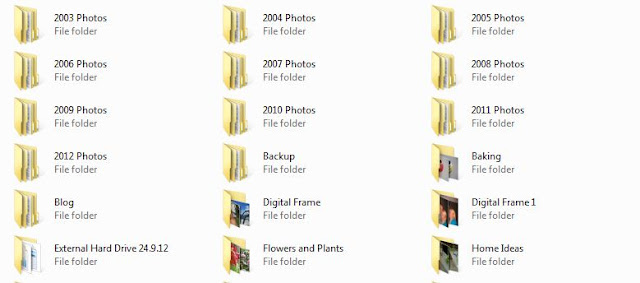
Organising Photos Digitally
With all of the time I have been spending on the couch lately, I haven't done many projects at all. One project that I could work on from the comfort of my beloved couch was backing up and organising all of my digital photos.
Earlier this year, I bought myself a 1 Terrabyte External Hard Drive. I wanted something that would last for years, and hold all of my photos, movies and computer files as a back-up. I have backed up my work laptop, my portable External Hard Drive which has all of my work files on it, my Digital Frame USBs plus all of our photos.
Earlier this year, I bought myself a 1 Terrabyte External Hard Drive. I wanted something that would last for years, and hold all of my photos, movies and computer files as a back-up. I have backed up my work laptop, my portable External Hard Drive which has all of my work files on it, my Digital Frame USBs plus all of our photos.

Subscribe to:
Posts (Atom)


 Posts


